An AI-driven interview practice platform for UX designers
Prepfolio
COMPANY

ROLE
EXPERTISE
Duration

What is Prepfolio?
What is the Problem?
Our Team
4 UX Designers @ University of Michigan
My Designed Pages
Behavioral Questions Practice • Portfolio Walkthrough • Design Challenge • App Critiques
Tools of Choice
Figma, FigJam, Miro
8 Users Interviewed
We conducted interviews with 8 users preparing for job, graduate school, and interviews. For our interviews, we set up three main research goals:
Understand motivations behind interview preparation
Identify why people practice for interviews, what drives their preparation habits, and what skills or behaviors they hope to improve.
Explore current preparation behaviors and workflows
Examine how users prepare for interviews across formats (in-person vs. virtual), what tools or platforms they use, and how effective these methods feel.
Identify pain points and unmet needs in existing prep tools
Surface frustrations related to finding relevant questions, receiving feedback, and accessing role-specific or authentic practice experiences.
What did we learn?
Through affinity mapping in Miro, we synthesized our interview data and uncovered 3 core user needs that shape how people prepare for interviews.

Reducing Anxiety & Building Confidence
Users consistently described feeling anxious, uncertain, and prone to rambling during interviews. They practiced primarily to reduce fear, build confidence, and improve clarity when answering on-the-spot questions.
Many expressed a desire for tools that help them speak more concisely and enter interviews feeling prepared rather than overwhelmed.
“I’m a rambler. I get very anxious during [interviews], so I like having a prepped idea of what I want to say if certain questions are brought up.”
- P01
Personalized Role-Relevant Practice
Participants were frustrated by generic interview prep platforms that lacked role-specific questions. They frequently searched across multiple sites (Google, Indeed, Glassdoor) to find relevant prompts but still struggled, especially those applying to specialized roles.
Users wanted practice materials tailored to the company, role, and domain so they could craft more aligned responses.
“I want to know more about the company, its mission, and the interviewer.”
- P03
Structured Guidance & Actionable Feedback
Across all interviews, users emphasized the importance of structured practice and clear feedback. They relied on mock interviews, ChatGPT and frameworks like STAR to add consistency and reduce decision fatigue.
Feedback, whether from peers or AI, helped them understand whether their responses were too long or vague. This guidance was a critical factor in helping them refine their delivery and improve confidence.
“Before an interview, I’ll remind myself of a few leadership stories from Boy Scouts or on a sports team, which could be used for a variety of interview questions. Instead of preparing for each question individually, I’ll prepare a short list of illustrative stories. This lends well to the STAR method that many companies, like Amazon, expect in behavioral interviews.” - P07


3 Design Goals for the Application
3 goals led the design work when creating this application for our personas and real world users.
Provide Structured Guidance & Actionable Feedback
Create a clear, supportive practice system that helps users know what to do next and how to improve.
AI-powered feedback on clarity, length, and structure
Progress roadmaps and streaks to encourage consistent practice
Reduce Anxiety & Build Interview Confidence
Support users in feeling prepared and articulate during high-pressure situations.
Voice-based practice to strengthen spontaneous speaking and reduce rambling
Offer Diverse, Role-Relevant Design Interview Practice
Give users access to realistic exercises that mimic actual product design interviews.
Whiteboarding prompts, app critiques, behavioral questions, and portfolio walkthrough practice
Information Architecture
The information architecture was intentionally structured into 3 high-level categories to minimize cognitive load and support a clear navigation pathway:


We implemented a top-level navigation bar featuring a Practice dropdown menu, along with direct access buttons for the Discussion Board and My Profile.
Initial Wireframes
Using Figma, we designed initial wireframes of the Prepfolio desktop application.
I designed wireframes for 4 main pages: behavioral interview practice questions, whiteboarding/design challenge, app critique practice, and the portfolio walkthrough practice.

8 Usability Tests Conducted
Brief Overview
Recruited Participants
My team and I developed a clear usability test plan outlining session goals, participant tasks, and team roles. In total, 8 participants were recruited - those who aligned closely with Prepfolio’s target users:
Early-career or aspiring UX designers
Some experience with behavioral interviews
Comfortable using digital tools and web interfaces
Methodology
Usability study sessions
Moderated usability sessions were 30–45 minutes long and included both a think-aloud protocol and task-based scenarios. Participants interacted with an interactive low-fidelity Figma prototype, which allowed us to control navigation paths and test multiple flows efficiently.
Sessions were hosted on Zoom, where the moderator guided the conversation and observers took notes. All sessions were recorded with participant consent for later analysis.
Each session included:
A warm, friendly introduction and brief background questions
Consent to record and assurance of anonymity
A think-aloud walkthrough of key tasks in the Figma prototype
Following every session, our team debriefed to compare observations and identify recurring usability issues that could impact trust, clarity, or task success.
Tasks tested
Post a question to the community discussion board.
I observed how users browsed posts, explored comments, and used filters and tags. I also asked them to post a new question to understand how intuitive the discussion flow felt.

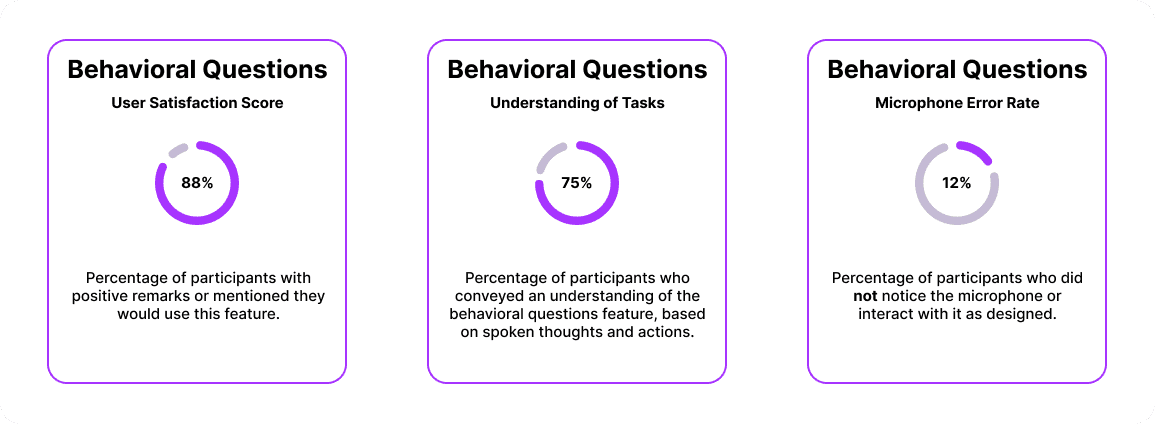
Answer behavioral interview questions and view feedback.
I observed how users recorded responses using the microphone, interacted with the interview interface, and navigated the feedback screen.

Complete a whiteboard design challenge and view feedback.
I observed users’ first impressions of the challenge, how they interpreted instructions, and how they navigated the workspace.

Usability test results

Post a question to the community discussion board.
Positive Comments:
Appreciated the breadcrumb feature for understanding their location of the website.
Features like upvote and comment were easy to identify.
Tags seem to be useful.
Shapes of boxes helps define sections of questions.
Having the number of answers under the question is helpful.
Constructive Feedback:
The text icon was unclear in meaning.
The difference between post and post details is not clear.
Unsure what the filter is filtering since there already two other filters (role, category).
Answer behavioral interview questions and view feedback.
Positive Comments:
Can see the timer and understands that there is a time limit.
Liked the layout and the color separation of the background.
Constructive Feedback:
Unclear if the the remaining time is for the single question or for the whole mock interview session.
Might need to add a “redo” for the recording (gives users multiple tries).
Timer is too small.
Maybe change the color of size of the finish button because couldn’t really tell if it was a finish or just another “next question” button.
Complete a whiteboard design challenge and view feedback.
Positive Comments:
Description of the project is clear.
Timer feature is clear.
Likes the feature; helpful feature for people who have Zoom interviews.
Constructive Feedback:
Too much text on the left side.
Confused if it is just recording the audio or also recording the whole screen.
"You know, we tend to like ignore stuff. You know, there's, this is a big chunk of text, right? And for me, who does not like reading, yeah, I tend to ignore stuff."
Back to the Drawing Board!
I worked on updated the designs based on usability test results, while working with my team to create Prepfolio's brand.
The two main colors for our application are
purple (#A734FF) and blue (#6E91ED). We decided on these two because purple conveys ambition and blue represents inspiration, which aligns with the goals of our application.
We also kept all imagery simple by primarily using icons. To ensure clarity and accessibility, text labels are located beneath each icon so users can easily understand what each button does.


Updated Design Challenge
I Separated 1 page into 3 pages to follow a progressive disclosure model.
Why?
Too much text makes the content difficult to read and understand. Separating the information into multiple pages reveals information gradually, decreasing cognitive load.
I repositioned the microphone and gave it a prominent, primary color.
Why?
Recording is a key feature of the design challenge and multiple participants missed the microphone, meaning it needed to be higher in the visual hierarchy and draw attention to itself.
I designed the whiteboard to be a larger pop-up.
Why?
Many participants mentioned a desire for a larger whiteboard for their notes and designs. Turning the whiteboard into a pop-up allows it to expand and use more space.
I provided an upload button for other media.
Why?
Other participants explained their preference for other design materials, such as pen and paper, Sketch, or Figma. Adding an upload button allows for other media.

Updated Behavioral Questions
I used color to highlight the timer countdown and added title above the numbers.
Why?
Some participants did not notice the timer countdown during their usability studies. Other were confused if the timer was meant for one question or all questions. Highlighted the timer and added “Total Time Remaining” helps clear up confusion.
I removed the input bar and reorganized “settings” and “rest questions” into a toolbox with “type response.”
Why?
Multiple participants mentioned confusion about the “type response” input bar. Adding an icon and label for the “type response” supports recognition. Furthermore, the toolbox visually groups similar buttons together.
User Flows & Interactions
Using FigJam, we mapped out user flow diagrams for primary features to clearly illustrate the intended user interactions.


Final Figma Designs
After 3 months of researching, designing, and redesigning, we finalized our Prepfolio desktop application!
Curious to see more?
Results & Reflection
Positive User Testing
Classmates responded well during user testing, indicating Prepfolio’s interview simulation was intuitive and valuable.
Collaboration Skills
Working as a team on Prepfolio taught us the importance of clear roles, task coordination, and open idea exchange.
Challenge of Simplicity
Especially when redesigning the Design Challenge page, balancing necessary features with a simple interface was a key challenge and I learned that less is often more.
Communication of Designs
Presenting our findings and design decisions helped us practice communicating design value clearly to non-design audience, such as other professors or members of the cohort.


